Fast Ethernet vs Gigabit Ethernet
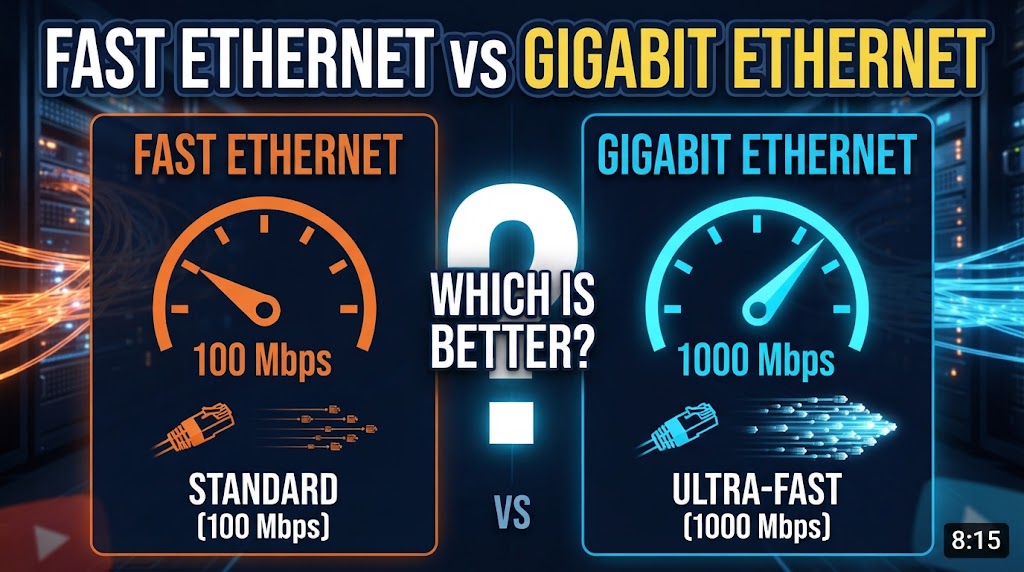
Fast Ethernet and Gigabit Ethernet are both wired networking technologies used to connect computers, routers, switches, cameras, and other network devices. The main difference is their maximum network speed. Fast Ethernet typically supports speeds up to 100 Mbps, while Gigabit Ethernet can reach up to 1 Gbps, which is ten times faster.
For basic internet browsing and simple networking, Fast Ethernet can still work. However, Gigabit Ethernet offers much higher bandwidth for file transfers, high-speed internet connections, video streaming, CCTV systems, and modern home or office networks. The better option depends on the speed requirements of your network and the devices you are connecting.
Quick Comparison: Fast Ethernet vs Gigabit Ethernet
| Feature | Fast Ethernet | Gigabit Ethernet |
|---|---|---|
| Maximum Speed | Up to 100 Mbps | Up to 1 Gbps |
| Speed Difference | Lower | Up to 10× faster |
| Common Standard | 100BASE-TX | 1000BASE-T |
| Typical Cable | Cat5 or better | Cat5e or better |
| Large File Transfers | Slower | Much faster |
| High-Speed Internet | Limited | Better suited |
| CCTV Networking | Suitable for basic setups | Better for higher bandwidth |
| Cost | Usually lower | Usually slightly higher |
| Best For | Basic networks | Modern home and office networks |
Speed: Fast Ethernet vs Gigabit Ethernet
The biggest difference between the two technologies is network speed.
Fast Ethernet provides speeds of up to 100 Mbps, while Gigabit Ethernet provides speeds of up to 1,000 Mbps (1 Gbps).
In ideal conditions, Gigabit Ethernet can transfer data at up to ten times the speed of Fast Ethernet. This difference becomes noticeable when transferring large files or moving large amounts of data between network devices.
Advantage: Gigabit Ethernet
Fast Ethernet vs Gigabit Ethernet for File Transfers
Fast Ethernet can handle everyday file transfers, but large files can take considerably longer to transfer.
Gigabit Ethernet provides much more bandwidth, making it more suitable for transferring large videos, backups, software files, and other data between computers or network storage devices.
For example, a computer connected to a Gigabit Ethernet network can potentially transfer a large file much faster than a device limited to 100 Mbps, although actual speeds depend on the storage devices, network equipment, cables, and other factors.
Advantage: Gigabit Ethernet
Fast Ethernet vs Gigabit Ethernet for Internet Speed
Your Ethernet connection does not automatically make your internet faster than the speed provided by your internet service.
For example, if your internet plan provides 100 Mbps, Fast Ethernet can generally handle that connection. But if you have an internet plan above 100 Mbps, Fast Ethernet can become a limitation.
Gigabit Ethernet provides enough network capacity for internet connections up to 1 Gbps, assuming the router, switch, computer, and other equipment also support the required speed.
Advantage: Gigabit Ethernet
Cable Compatibility
Fast Ethernet commonly works with Cat5 or better twisted-pair Ethernet cabling.
Gigabit Ethernet over copper commonly uses 1000BASE-T and can operate over Cat5e or better cabling. The actual network speed can still depend on cable quality, installation, connectors, and the capabilities of the connected devices.
If you are building a new network, Cat5e or higher is generally a more practical choice for Gigabit Ethernet.
Advantage: Gigabit Ethernet
Fast Ethernet vs Gigabit Ethernet for CCTV
Both technologies can be used for IP CCTV networks.
Fast Ethernet may be sufficient for smaller CCTV installations with cameras that do not require much bandwidth. However, modern cameras can produce higher-resolution video, increasing network bandwidth requirements.
Gigabit Ethernet provides considerably more network capacity, making it more suitable for networks with multiple IP cameras, higher-resolution video, or additional network traffic.
For a small CCTV setup, Fast Ethernet may be enough. For a larger or more demanding installation, Gigabit Ethernet provides more room for growth.
Advantage: Gigabit Ethernet
Cost
Fast Ethernet equipment can be inexpensive, particularly when using older network hardware.
Gigabit Ethernet equipment is also widely available and has become common in modern routers, switches, computers, and other networking devices. The price difference is often less important than it used to be.
If you are installing a new network, choosing Gigabit Ethernet can provide significantly more bandwidth without requiring a major increase in equipment cost.
Advantage: Depends
Power Consumption
The actual power consumption depends on the specific router, switch, network adapter, and other hardware rather than Ethernet speed alone.
Older Fast Ethernet equipment may consume less power simply because of its design and age, while modern Gigabit Ethernet devices can also be designed for efficient operation.
Therefore, Ethernet speed by itself is not enough to determine which setup will use less electricity.
Advantage: Depends
Which Is Better for Home Networking?
For a basic home network with older computers, simple internet use, and an internet connection of 100 Mbps or less, Fast Ethernet may be sufficient.
However, Gigabit Ethernet is generally more suitable for a modern home network because it provides much higher bandwidth for computers, smart TVs, network storage, gaming, high-speed internet, and local file transfers.
Better choice for most modern home networks: Gigabit Ethernet
Which Is Better for Office Networking?
Office networks often handle multiple users, shared files, printers, cloud applications, backups, video calls, and other network traffic.
Gigabit Ethernet provides substantially more bandwidth for these activities. It is therefore better suited to most modern office networks than Fast Ethernet.
Better choice: Gigabit Ethernet
Fast Ethernet vs Gigabit Ethernet: Which Should You Choose?
Choose Fast Ethernet if:
- Your network only requires up to 100 Mbps.
- You are using older networking equipment.
- Your internet connection is 100 Mbps or less.
- You have a basic network with low data-transfer requirements.
- Keeping existing equipment is more important than upgrading speed.
Choose Gigabit Ethernet if:
- You have an internet connection above 100 Mbps.
- You frequently transfer large files.
- You use network storage or NAS.
- You have multiple network devices.
- You are installing a new home or office network.
- You want more bandwidth for future requirements.
Overall Winner: Gigabit Ethernet
For most modern networks, Gigabit Ethernet is the better choice because it offers up to 1 Gbps of bandwidth compared with 100 Mbps for Fast Ethernet. It is particularly useful for high-speed internet, large file transfers, modern office networks, and higher-bandwidth CCTV installations.
Fast Ethernet can still be practical for simple or older networks where 100 Mbps is sufficient. However, when both options are available for a new installation, Gigabit Ethernet provides substantially more network capacity and better room for future requirements.
Disclaimer
Network speeds mentioned in this comparison are maximum theoretical link speeds. Actual performance can vary depending on network devices, cable quality, distance, hardware limitations, network traffic, and other factors. Product specifications and prices may also change over time.
SEO Details
Focus Keyphrase: Fast Ethernet vs Gigabit Ethernet
Related Keywords:
Fast Ethernet vs Gigabit Ethernet which is better, 100 Mbps vs 1 Gbps Ethernet, Fast Ethernet speed, Gigabit Ethernet speed, 100BASE-TX vs 1000BASE-T, Ethernet network speed
SEO Title: Fast Ethernet vs Gigabit Ethernet: Which Is Better?
Meta Description: Fast Ethernet vs Gigabit Ethernet compared for speed, cables, file transfers, internet, CCTV, cost, and home or office networking.
Suggested URL Slug: fast-ethernet-vs-gigabit-ethernet
WordPress Tags
Fast Ethernet, Gigabit Ethernet, Ethernet Speed, 100 Mbps vs 1 Gbps, 100BASE-TX, 1000BASE-T
If you want, just say “next” and I’ll make Gigabit Ethernet vs 2.5G Ethernet in the same Parkhu format.